





app new release function

New feature release: Find My Hover & Gesture Landing

In our newest release, you'll find "Find my hover" and gesture landing features. Please make sure that your APP and firmware versions are up-to-date! We are now on app version v2.7.0 and firmware version v7.5.0. Want to know more about how to update firmware, check article here: https://hoverair.com/blogs/guide/hover-x1-app-introduction

"Find my hover" Function:

In case your HOVERAir X1 goes missing, the "Find my hover" function will broadcast a sound allowing you to find it. After landing, if there is no interaction with your hover for 60 seconds, it will emit a distinctive sound. To set it up:

  1. Open the app.
  2. Connect to your Hover.
  3. Navigate to Hover Settings.
  4. Access Voice Settings.
  5. Enable the "Find my hover" option.

You have the option to click "on" to activate this function or choose to turn it off. When enabled, if HOVERAir X1 fails to complete the trajectory and land on the palm of your hand, a voice announcement will play 60 seconds after landing, helping you locate it by sound. 

Upon locating your HOVERAir, you can press any button on the drone during the voice announcement to promptly stop the announcement.

Dolly Track Gesture Control Landing Function

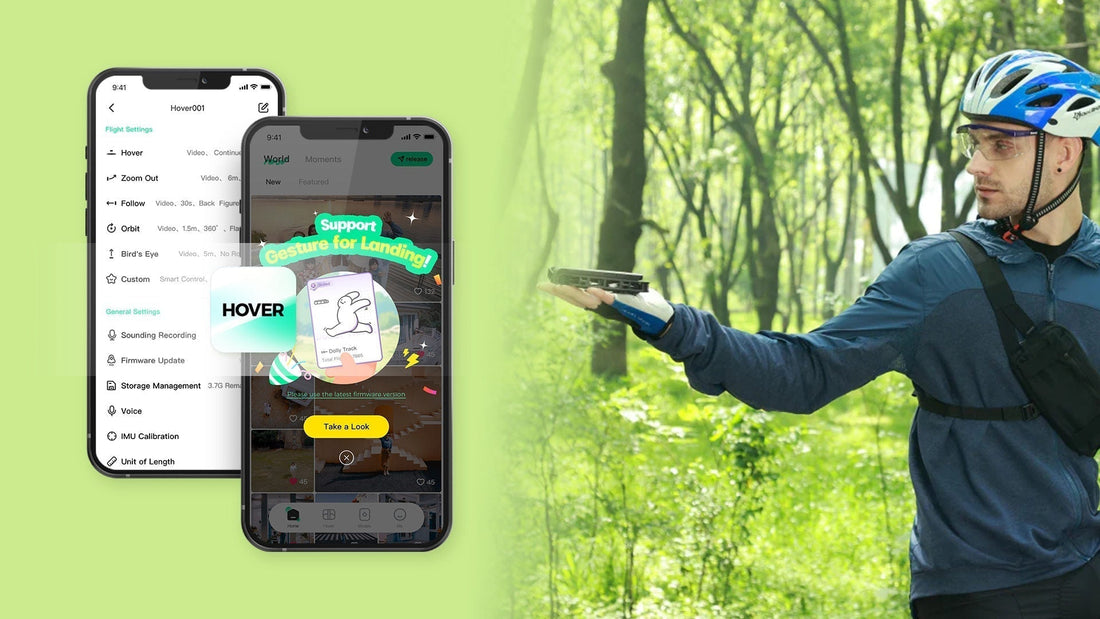
Gesture control functionality for the Dolly track mode is now accessible. This allows you to control the landing of HOVER using a gesture. To initiate this feature: Navigate to flight mode, select Dolly track, and click on "Take a look." 

And Select the yellow button labeled "Learn Landing Gesture."

HOVERAir X1 flight mode
HOVERAir X1 dolly track

Press the "Start Now" button to initiate the test flight. 

Following three steps of flight,

click "Got it," and it will automatically default to the "gesture or stand for 3 seconds" landing mode. This allows you to land your HOVERAir X1 using either gesture control or standing still for 3 seconds. 

If you wish to make adjustments, navigate to hover settings > custom > dolly track > Landing Method.

Kindly be aware that: 

When utilizing gestures to control the landing of your hover, it is necessary to cross your hands above your head. During this process, the status light will appear red. Upon successful triggering of the landing gesture, the status light will transition from red to green.

Regresar al blog

Deja un comentario

Ten en cuenta que los comentarios deben aprobarse antes de que se publiquen.

  • A Complete Guide to Auto Correction in HOVERAir Angle Track

    A Complete Guide to Auto Correction in HOVERAir...

    What is Auto Correction? During Angle Track, rapid movement, acceleration, or quick turns by the user can cause your Hover device's relative position to the subject to change. With Auto...

    A Complete Guide to Auto Correction in HOVERAir...

    What is Auto Correction? During Angle Track, rapid movement, acceleration, or quick turns by the user can cause your Hover device's relative position to the subject to change. With Auto...

  • 10 Must-Have Drone Shots with HOVERAir X1 PROMAX

    10 Must-Have Drone Shots with HOVERAir X1 PROMAX

    Whether you’re shooting cinematic travel films, YouTube content, or client projects, mastering a few key drone shots can completely transform your storytelling. In this guide, we’ll break down 10 essential...

    10 Must-Have Drone Shots with HOVERAir X1 PROMAX

    Whether you’re shooting cinematic travel films, YouTube content, or client projects, mastering a few key drone shots can completely transform your storytelling. In this guide, we’ll break down 10 essential...

  • The Hottest Tech Gadget to Gift This Year: A HOVERAir Self-Flying Camera

    The Hottest Tech Gadget to Gift This Year: A HO...

    Just in time for the holidays, HOVERAir is offering up to 30% off — the perfect chance to gift next-level, AI-enhanced aerial creativity. This holiday season takes off with HOVERAir....

    The Hottest Tech Gadget to Gift This Year: A HO...

    Just in time for the holidays, HOVERAir is offering up to 30% off — the perfect chance to gift next-level, AI-enhanced aerial creativity. This holiday season takes off with HOVERAir....

1 de 3
  • AQUA, THE WORLD’S FIRST WATERPROOF  SELF-FLYING CAMERA, PREMIERES AT CES 2026

    AQUA, THE WORLD’S FIRST WATERPROOF SELF-FLYING...

    PRESS RELEASEDecember 16th, 2025Palo Alto, USAMaking a splash at CES 2026, HOVERAir is showcasing its 4K waterproof drone-designed for watersports-live in Las Vegas. Palo Alto, Dec. 16, 2025 - Zero...

    AQUA, THE WORLD’S FIRST WATERPROOF SELF-FLYING...

    PRESS RELEASEDecember 16th, 2025Palo Alto, USAMaking a splash at CES 2026, HOVERAir is showcasing its 4K waterproof drone-designed for watersports-live in Las Vegas. Palo Alto, Dec. 16, 2025 - Zero...

  • HOVERAir partners with Freeride World Tour 2026

    HOVERAir partners with Freeride World Tour 2026

    HOVERAir is proud to be a premium supplier of the Freeride World Tour 2026, bringing breathtaking aerial footage of the world’s best freeriders to every stop. With the new Ski...

    HOVERAir partners with Freeride World Tour 2026

    HOVERAir is proud to be a premium supplier of the Freeride World Tour 2026, bringing breathtaking aerial footage of the world’s best freeriders to every stop. With the new Ski...

  • From Oprah to Men’s Health: HOVERAir PROMAX Takes Home Two Big Awards

    From Oprah to Men’s Health: HOVERAir PROMAX Tak...

    This holiday season, the gift that literally flies off the shelves just made history. HOVERAir PROMAX was awarded not once, but twice today! PROMAX is officially one of Oprah’s Favorite Things...

    From Oprah to Men’s Health: HOVERAir PROMAX Tak...

    This holiday season, the gift that literally flies off the shelves just made history. HOVERAir PROMAX was awarded not once, but twice today! PROMAX is officially one of Oprah’s Favorite Things...

1 de 3
    1 out of ...